Search packages, repositories and app categories

piano cover
Package detailsv1.0.4

piano

Utilities and widgets for working with piano sheet music learning.

AndroidiOSWebmacOSWindowsLinux
30-day downloads
108
Likes
41
Pub points
30

Install package

flutter pub add piano

Package Overview

Package selection guidance compiled from public package information, community data, and project usage.

The piano package provides utilities and widgets designed to support learning piano sheet music. It offers interactive components for displaying and engaging with musical notation, enabling users to visualize notes, practice timing, and improve reading skills. Built with Flutter, it integrates seamlessly across mobile, web, and desktop platforms, making it ideal for educational applications focused on music education. The package is lightweight and customizable, supporting developers in creating intuitive piano learning experiences.

Use cases

  • Interactive sheet music display
  • Piano note recognition
  • Music education apps
  • Practice timer integration
  • Real-time feedback systems

Key features

  • Note visualization
  • Cross-platform compatibility
  • Customizable UI widgets
  • Support for MIDI input
  • Integration with Flutter's rendering engine

Suitable for

  • Music educators
  • App developers
  • Students learning piano
  • Educational software creators

Considerations

  • Requires knowledge of music notation
  • Limited to piano-specific content
  • Depends on external MIDI or input sources
  • Best suited for structured learning environments
Original README

Original README snapshot from the linked source repository. Visit the repository for the latest content.

Piano

A Flutter package that provides:

  • logic for working with musical notes, clefs and octaves;
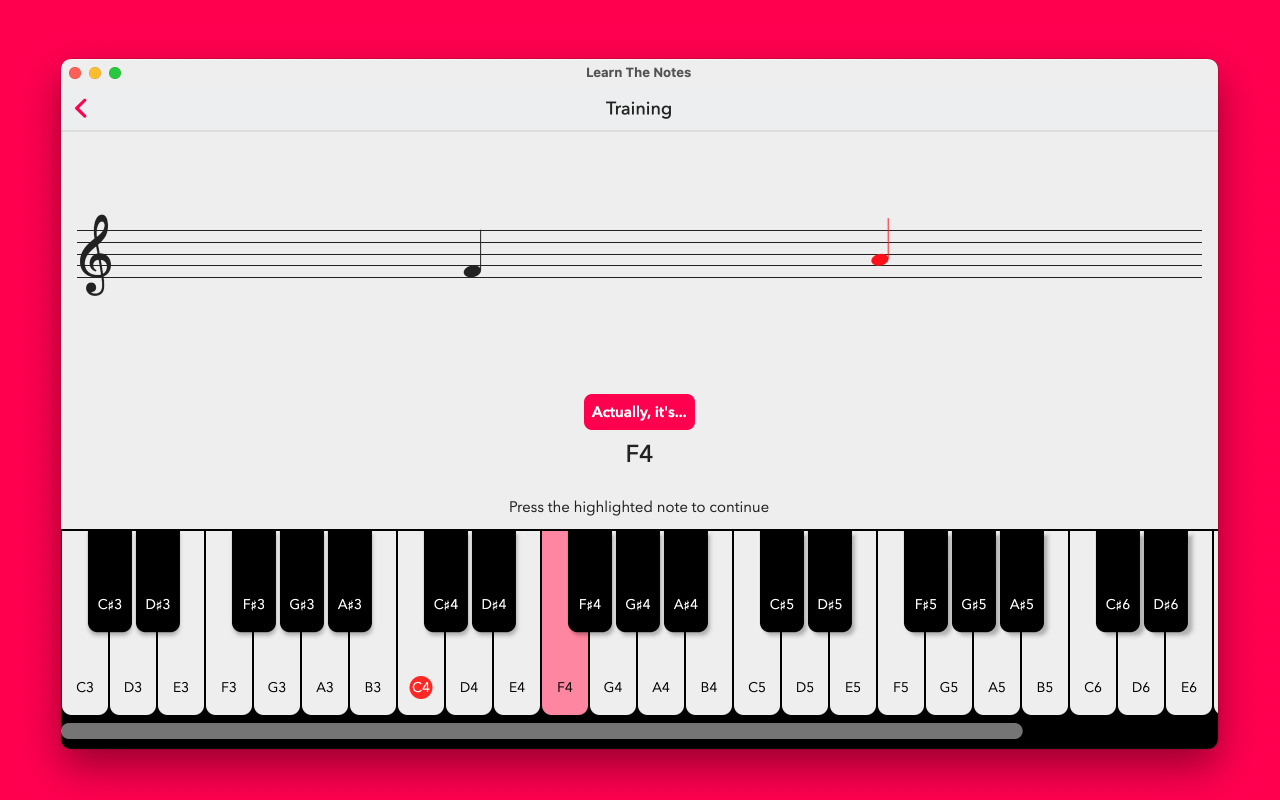
  • a widget that can render notes on a clef;
  • an interactive piano widget.

Where is it used?

In "Learn The Notes", a simple sight reading trainer you can find on the iOS App Store here and macOS App Store here.

Example showing musical clef and interactive piano

How do I use it?

Here's an example app:

import 'package:flutter/cupertino.dart';
import 'package:flutter/material.dart';
import 'package:piano/piano.dart';

void main() {
  runApp(MyApp());
}

class MyApp extends StatelessWidget {
  @override
  Widget build(BuildContext context) {
    return CupertinoApp(
        title: 'Piano Demo',
        home: Center(
          child: InteractivePiano(
            highlightedNotes: [
              NotePosition(note: Note.C, octave: 3)
            ],
            naturalColor: Colors.white,
            accidentalColor: Colors.black,
            keyWidth: 60,
            noteRange: NoteRange.forClefs([
              Clef.Treble,
            ]),
            onNotePositionTapped: (position) {
              // Use an audio library like flutter_midi to play the sound
            },
          ),
        ));
  }
}

More like this

  • I blog about Flutter here: https://handform.net/
  • I'm on LinkedIn: https://www.linkedin.com/in/craigbmcmahon/

Categories

Dependencies

Dependency list 3 items

Source repository

Projects using this package

No data available yet.