
Search packages, repositories and app categories

Package detailsv1.0.0

sliver_calendar

Display a calendar view for flutter.

30-day downloads
32
Likes
22
Pub points
40

Install package

flutter pub add sliver_calendar

Package Overview

Package selection guidance compiled from public package information, community data, and project usage.

A Flutter package that provides a sliver-based calendar view for displaying dates in a scrollable, efficient layout. Designed for use within custom scroll views, it supports smooth scrolling and dynamic date rendering. The package is ideal for apps requiring a clean, interactive calendar interface with minimal boilerplate. It integrates seamlessly into existing Flutter projects using the provided add command.

Use cases

  • Displaying daily events in a scrollable calendar
  • Building appointment scheduling interfaces
  • Integrating date pickers in scrollable forms
  • Creating timeline-based applications
  • Implementing calendar views in dashboards

Key features

  • Sliver-based performance optimization
  • Customizable date cell styling
  • Support for event markers
  • Built-in navigation controls
  • Efficient rendering for large date ranges

Suitable for

  • Developers building scrollable calendar UIs
  • Apps needing lightweight calendar components
  • Projects using CustomScrollView
  • Teams prioritizing performance and scalability
  • Flutter beginners exploring slivers

Considerations

  • Requires integration within a CustomScrollView
  • Limited built-in event management
  • No native localization support
  • May need additional styling for complex themes
  • Depends on external state management for event data
Original README

Original README snapshot from the linked source repository. Visit the repository for the latest content.

Calendar

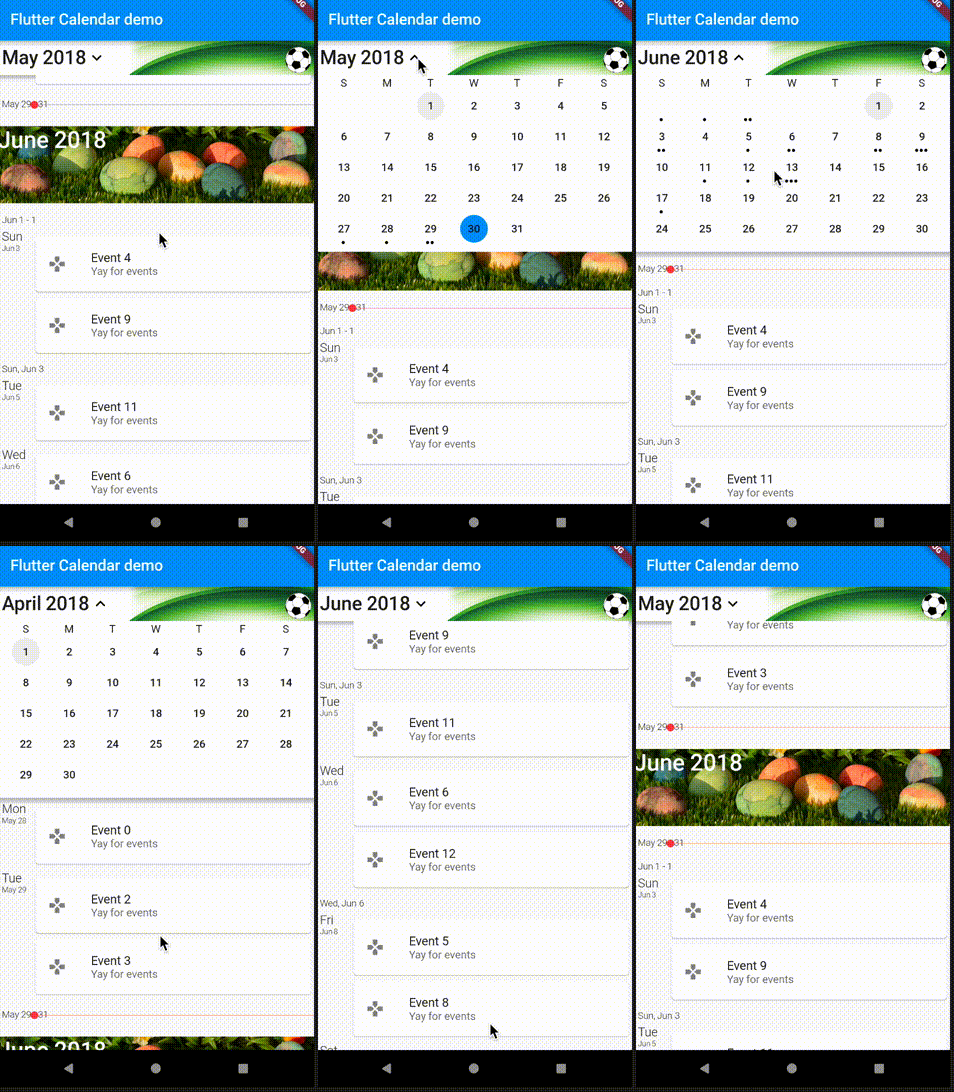
Shows a scrolling calendar list of events. This is still relatively basic, it always assumes that the getEvents returns the entire list of calendar events (mostly ignoring the values passed into the source). It does work however :) Optionally, you can use an image as a background for the calendar header and another image for the month header.

The calendar uses slivers to display the widgets in the view and lets you scroll forward and backward through the events. The header widget will drop down and open up the days of the month, letting you select specific days as well as move back and forth between the months. By default it displays a list of events and not a day view, the day view code is all just a stub right now.

Here is how to use the calendar widget itself:

new CalendarWidget(
              initialDate: new TZDateTime.now(local),
              buildItem: buildItem,
              getEvents: getEvents,
            );

How to setup a source for the calendar widget.

...
  List<Game> _listToShow;
  StreamSubscription<UpdateReason> _listening;

  @override
  Widget buildItem(BuildContext context, CalendarEvent event) {
    return new GameCard(_listToShow[event.index]);
  }

  @override
  List<CalendarEvent> getEvents(DateTime start, DateTime end) {
    if (_listToShow == null) {
      _listToShow = UserDatabaseData.instance.games.values.toList();
    }
    if (_listToShow == null) {
      return [];
    }
    List<CalendarEvent> events = new List<CalendarEvent>();
    int pos = 0;
    _listToShow.forEach((Game g) => events.add(new CalendarEvent(
        instant: g.tzTime, instantEnd: g.tzEndTime, index: pos++)));
    return events;
  }
...

Example of the calendar widget in action:

Getting Started

For help getting started with Flutter, view our online documentation.

For help on editing package code, view the documentation.

Categories

Dependencies

Dependency list 3 items

Source repository

Projects using this package

No data available yet.