Search packages, repositories and app categories

story_view cover
Package detailsv0.16.6

story_view

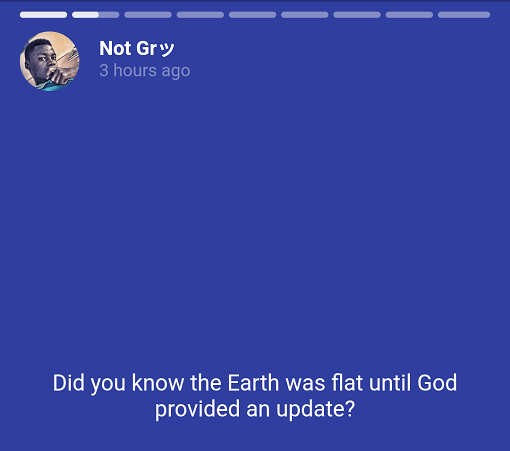
Display stories just like Whatsapp & Instagram. Can be used inline/inside ListView or Column just like Google News app. Comes with gestures to pause, forward & go to previous page.

AndroidiOSmacOS
30-day downloads
22K
Likes
822
Pub points
150

Install package

flutter pub add story_view

Package Overview

Package selection guidance compiled from public package information, community data, and project usage.

StoryView is a Flutter package that enables developers to display interactive, swipeable stories similar to those in WhatsApp and Instagram. It supports inline integration within lists or columns, making it ideal for news feeds or social media apps. The package includes built-in gestures for pausing, advancing, and navigating between story pages. Designed for smooth performance across platforms, it works seamlessly on Android, iOS, and macOS. With minimal setup via pub add, StoryView delivers a native-like storytelling experience with customizable controls and animations.

Use cases

  • Social media story feeds
  • News app content displays
  • In-app storytelling features
  • User engagement campaigns
  • Interactive product tours

Key features

  • Swipe navigation between stories
  • Pause and resume functionality
  • Gesture-based controls
  • Inline placement in ListView/Column
  • Cross-platform support (Android, iOS, macOS)

Suitable for

  • Apps needing Instagram-style story UIs
  • Content-heavy applications
  • Engagement-driven mobile experiences
  • Developers seeking easy story implementation
  • Projects requiring gesture-rich interactions

Considerations

  • May require optimization for long story sequences
  • Limited customization of story card design
  • Depends on external image/video loading for full functionality
  • Not suitable for complex animations beyond basic transitions
  • Performance may vary with high-resolution media

Original README

Original README snapshot from the linked source repository. Visit the repository for the latest content.

story_view Pub

Story view for apps with stories.

story_view

🍟 Watch video demo here: story_view demo

👨‍🚀 Demo project here: storyexample

This a Flutter widget to display stories just like Whatsapp and Instagram. Can also be used inline/inside ListView or Column just like Google News app. Comes with gestures to pause, forward and go to previous page.

Features

🕹 Still image, GIF and video support (with caching enabled)

📍 Gesture for pause, rewind and forward

⚜️ Caption for each story item

🎈 Animated progress indicator for each story item

📱 Fullscreen or inline

And useful callback to perform meta functionalities including vertical swipe gestures.

Installation

To use this plugin, add story_view as a dependency in your pubspec.yaml file.

Usage

Import the package into your code

import "package:story_view/story_view.dart";

Look inside examples/example.dart on how to use this library. You can copy and paste the code into your main.dart and run to have a quick look.

Basics

Use StoryView to add stories to screen or view heirarchy. StoryView requires a list of StoryItem, each of which describes the view to be displayed on each story page, duration and so forth. This gives you the freedom to customize each page of the story.

There are shorthands provided to create common pages.

StoryItem.text is a shorthand to create a story page that displays only text.

StoryItem.pageImage creates a story item to display images with a caption.

StoryItem.inlineImage creates a story item that is intended to be displayed in a linear view hierarchy like List or Column

🍭 Both .inlineImage and pageImage support animated GIFs.

StoryItem.pageVideo creates a page story item with video media. Just provide your video url and get going.

Story controller, loaders and GIF support

While images load, it'll be a better experience to pause the stories until it's done. To achieve this effect, create a global instance of StoryController and use the shorthand StoryItem.pageImage or StoryItem.inlineImage while passing the same controller instance to it.

...
final controller = StoryController();

@override
Widget build(context) {
  List<StoryItem> storyItems = [
    StoryItem.text(...),
    StoryItem.pageImage(...),
    StoryItem.pageImage(...),
    StoryItem.pageVideo(
      ...,
      controller: controller,
    )
  ]; // your list of stories

  return StoryView(
    storyItems,
    controller: controller, // pass controller here too
    repeat: true, // should the stories be slid forever
    onStoryShow: (s) {notifyServer(s)},
    onComplete: () {},
    onVerticalSwipeComplete: (direction) {
      if (direction == Direction.down) {
        Navigator.pop(context);
      }
    } // To disable vertical swipe gestures, ignore this parameter.
      // Preferrably for inline story view.
  )
}

🍭 Now, tell your users some stories.

Docs

Find docs from here: pub.dev/story_view

Categories

Dependencies

Dependency list 4 items

Source repository

Projects using this package