
Overview
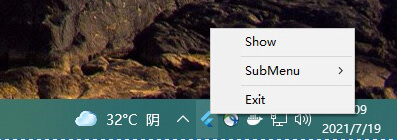
The system_tray package enables Flutter desktop applications to integrate a customizable system tray icon on Windows, macOS, and Linux. It allows developers to create context menus, handle user interactions, and manage app lifecycle events through the system tray. The package provides a simple API for adding icons, defining menu items, and responding to clicks, making it ideal for background apps or utilities that need persistent presence without cluttering the main interface. It supports platform-specific behaviors and is designed for seamless integration with desktop environments.
Use cases
- Background services
- App notifications
- Quick access tools
- System utility apps
- Minimized app management
Key features
- Customizable tray icon
- Platform-specific tray behavior
- Context menu support
- Click event handling
- Cross-platform desktop compatibility
Suitable for
- Desktop app developers
- System-level utilities
- Always-running background apps
- User-facing desktop tools
- Minimal UI applications
Considerations
- Requires desktop platform targeting
- Limited to tray-only interaction
- May need platform-specific styling
- No mobile support
- Depends on native system capabilities