Search categories, packages and repositories

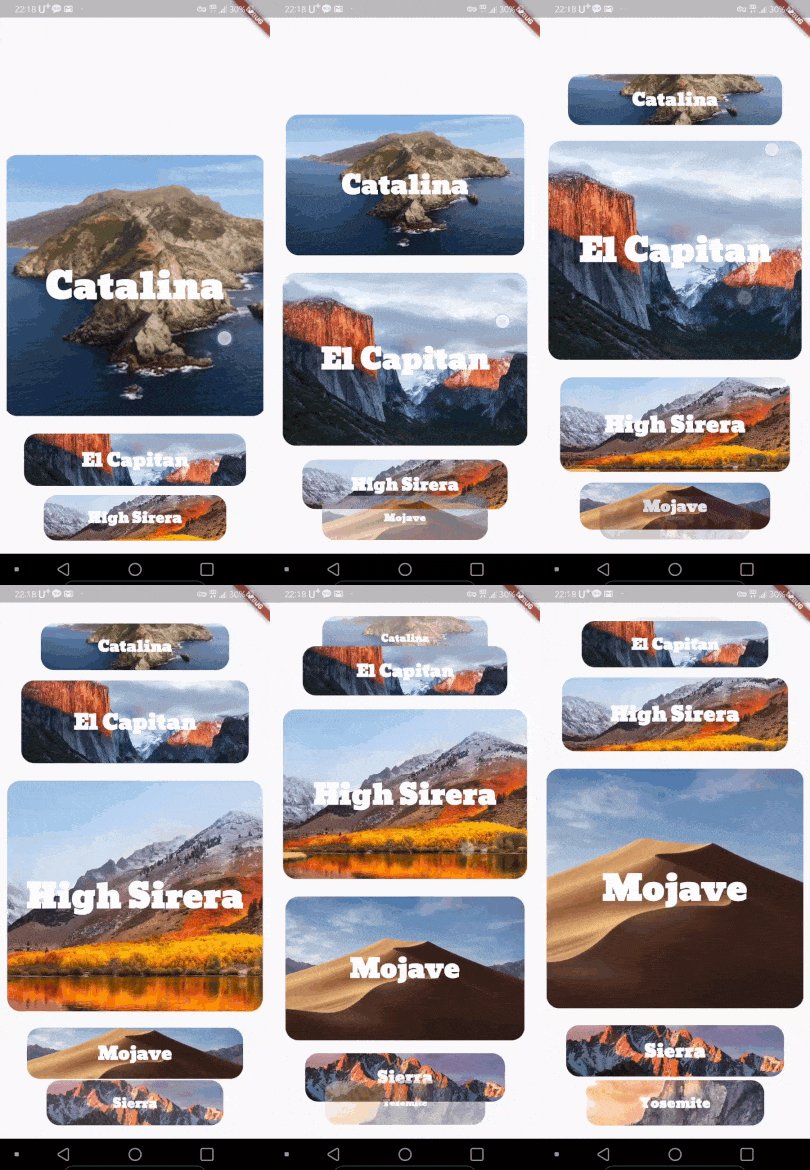
vertical_card_pager cover
Package detailsv1.6.3

vertical_card_pager

Use dynamic and beautiful card view pagers to help you create great apps.

AndroidiOSWeb
30-day downloads
314
Likes
313
Pub points
140

Install package

flutter pub add vertical_card_pager

Package Overview

Package selection guidance compiled from public package information, community data, and project usage.

A Flutter package that enables developers to create dynamic, visually appealing vertical card pagers. It supports smooth scrolling and interactive card transitions, ideal for showcasing content in a layered, engaging manner. Designed for use on Android, iOS, and Web, it enhances user experience with elegant animations and responsive layouts. The package is particularly useful for apps requiring immersive card-based navigation or content presentation.

Use cases

  • Interactive product showcases
  • User profile sliders
  • Content carousels
  • Educational app interfaces
  • Media browsing experiences

Key features

  • Smooth vertical card transitions
  • Customizable card appearance
  • Responsive design across platforms
  • Support for touch gestures
  • Built-in animation effects

Suitable for

  • Mobile and web app developers
  • Design-focused applications
  • Card-based UI implementations
  • Apps with rich visual content

Considerations

  • May require performance optimization for large datasets
  • Limited customization for complex layouts
  • Depends on stable gesture handling on all platforms

Original README

Original README snapshot from the linked source repository. Visit the repository for the latest content.


Use dynamic and beautiful card view pagers to help you create great apps.

Preview

Alignment

Left Center(Default) Right
left center right

Installing

  1. Add dependency to pubspec.yaml

    Get the latest version in the 'Installing' tab on pub.dartlang.org

dependencies:
    vertical_card_pager: ^1.6.0
  1. Import the package
import 'package:vertical_card_pager/vertical_card_pager.dart';
  1. Adding VerticalCardPager

With optional parameters

  @override
  Widget build(BuildContext context) {
    final List<String> titles = ["RED", "YELLOW", "BLACK", "CYAN", "BLUE", "GREY", ];

    final List<Widget> images = [
      Container(
        color: Colors.red,
      ),
        Container(
        color: Colors.yellow,
      ),
        Container(
        color: Colors.black,
      ),
        Container(
        color: Colors.cyan,
      ),
        Container(
        color: Colors.blue,
      ),
        Container(
        color: Colors.grey,
      ),
    ];
    return Scaffold(
      body: SafeArea(
        child: Column(
          children: <Widget>[
            Expanded(
              child: Container(
                child: VerticalCardPager(
                  titles: titles,  // required
                  images: images,  // required
                  textStyle: TextStyle(color: Colors.white, fontWeight: FontWeight.bold), // optional
                  onPageChanged: (page) { // optional
                  },
                  onSelectedItem: (index) { // optional
                  },
                  initialPage: 0, // optional
                  align : ALIGN.CENTER, // optional
                  physics : ClampingScrollPhysics() // optional 
                ),
              ),
            ),
          ],
        ),
      ),
    );
  }

How to use

Check out the example app in the example directory or the 'Example' tab on pub.dartlang.org for a more complete example.

Example on Web

https://origogi.github.io/Vertical_Card_Pager/#/

Reference

This package's animation is inspired from from this Dribbble art.

Categories

Source repository

Projects using this package

No data available yet.