Search packages, repositories and app categories

Package detailsv1.3.0

video_player_web_hls

Web platform implementation of video_player and supports hls on chrome and other browsers.

Web
30-day downloads
32.5K
Likes
79
Pub points
150

Install package

flutter pub add video_player_web_hls

Package Overview

Package selection guidance compiled from public package information, community data, and project usage.

A web platform implementation of the video_player package that adds HLS (HTTP Live Streaming) support for Chrome and other modern browsers. It enables seamless playback of HLS streams in Flutter web applications, extending the core video_player functionality to handle adaptive streaming protocols. This package is designed specifically for web environments where native HLS support may be limited or inconsistent.

Use cases

  • Playing HLS streams in Flutter web apps
  • Streaming live video content
  • Supporting adaptive bitrate streaming
  • Integrating with existing video_player workflows
  • Enabling cross-browser HLS compatibility

Key features

  • HLS stream support on web
  • Chrome and modern browser compatibility
  • Seamless integration with video_player
  • Adaptive bitrate playback
  • Lightweight and focused implementation

Suitable for

  • Flutter developers targeting web platforms
  • Apps requiring HLS video playback
  • Projects using adaptive streaming
  • Developers building video-centric web experiences
  • Teams needing reliable HLS support on web

Considerations

  • Limited to web platform only
  • Requires compatible browser (e.g., Chrome)
  • Depends on external HLS.js library
  • May need additional configuration for complex streaming setups
  • Not suitable for mobile or desktop platforms

Original README

Original README snapshot from the linked source repository. Visit the repository for the latest content.

video_player_web_hls

Version

Supports hls on chrome and other browsers.

Usage

...
dependencies:
  ...
  video_player_web_hls: ^0.1.1
  video_player: ^0.10.10

  ...

Add

 <script src="https://cdn.jsdelivr.net/npm/hls.js@latest"  type="application/javascript"></script>

in index.html above

 <script src="main.dart.js" type="application/javascript"></script>

dart:io

The Web platform does not suppport dart:io, so attempts to create a VideoPlayerController.file will throw an UnimplementedError.

Autoplay

Playing videos without prior interaction with the site might be prohibited by the browser and lead to runtime errors. See also: https://goo.gl/xX8pDD.

Supported Formats

Different web browsers support different sets of video codecs.

Video codecs?

Check MDN's Web video codec guide to learn more about the pros and cons of each video codec.

What codecs are supported?

Visit caniuse.com: 'video format' for a breakdown of which browsers support what codecs. You can customize charts there for the users of your particular website(s).

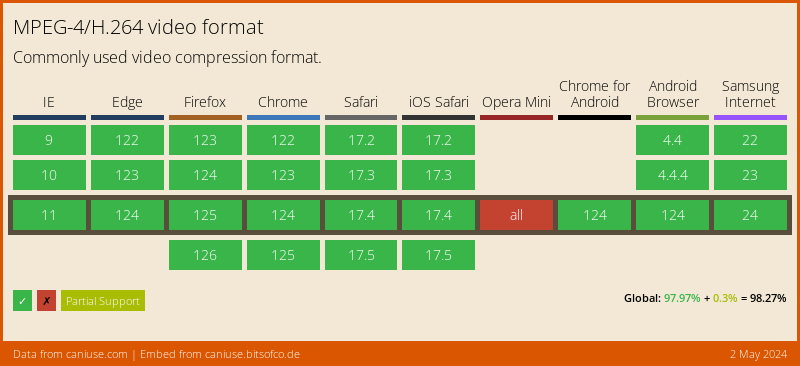
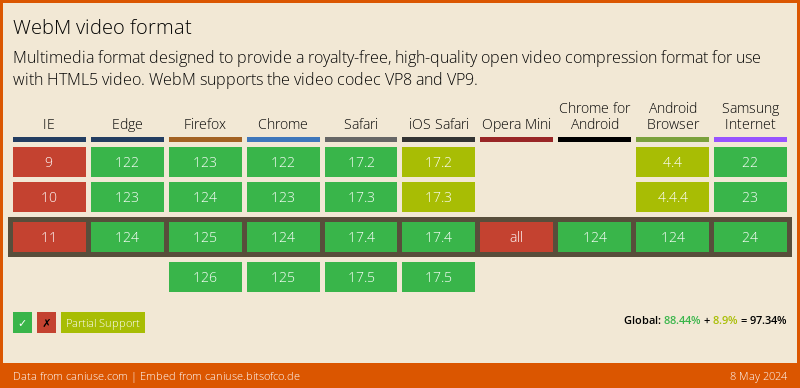
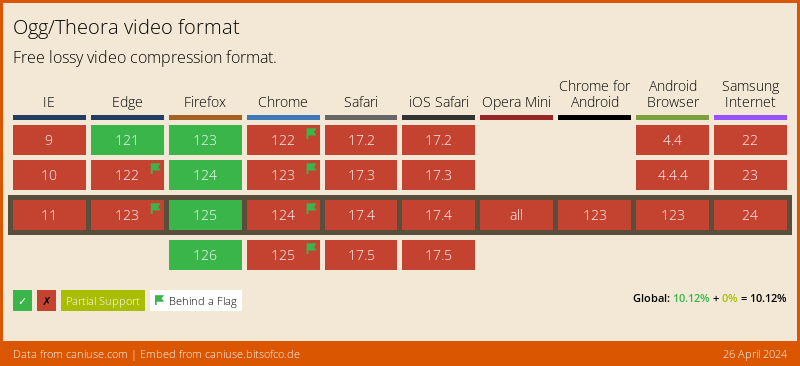
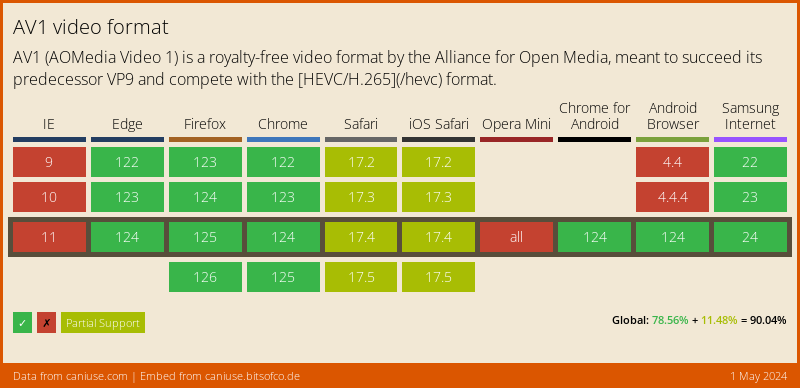
Here's an abridged version of the data from caniuse, for a Global audience:

MPEG-4/H.264

Data on Global support for the MPEG-4/H.264 video format

WebM

Data on Global support for the WebM video format

Ogg/Theora

Data on Global support for the Ogg/Theora video format

AV1

Data on Global support for the AV1 video format

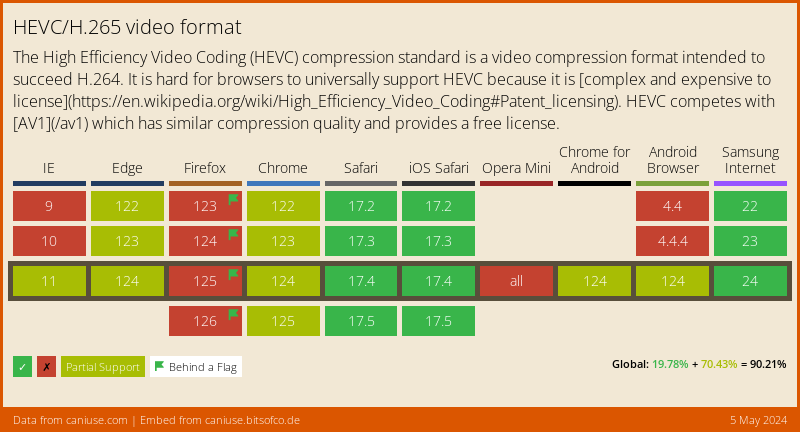
HEVC/H.265

Data on Global support for the HEVC/H.265 video format

Example

import 'package:video_player/video_player.dart';
import 'package:flutter/material.dart';

void main() => runApp(VideoApp());

class VideoApp extends StatefulWidget {
  @override
  _VideoAppState createState() => _VideoAppState();
}

class _VideoAppState extends State<VideoApp> {
  VideoPlayerController _controller;

  @override
  void initState() {
    super.initState();
    _controller = VideoPlayerController.network(
        'https://test-streams.mux.dev/x36xhzz/x36xhzz.m3u8')
      ..initialize().then((_) {
        // Ensure the first frame is shown after the video is initialized, even before the play button has been pressed.
        setState(() {});
      });
  }

  @override
  Widget build(BuildContext context) {
    return MaterialApp(
      title: 'Video Demo',
      home: Scaffold(
        body: Center(
          child: _controller.value.initialized
              ? AspectRatio(
                  aspectRatio: _controller.value.aspectRatio,
                  child: VideoPlayer(_controller),
                )
              : Container(),
        ),
        floatingActionButton: FloatingActionButton(
          onPressed: () {
            setState(() {
              _controller.value.isPlaying
                  ? _controller.pause()
                  : _controller.play();
            });
          },
          child: Icon(
            _controller.value.isPlaying ? Icons.pause : Icons.play_arrow,
          ),
        ),
      ),
    );
  }

  @override
  void dispose() {
    super.dispose();
    _controller.dispose();
  }
}

Categories

Dependencies

Dependency list 3 items

  • http^1.0.0
  • video_player_platform_interface^6.2.0
  • web>=1.0.0 <2.0.0

Source repository

Projects using this package