
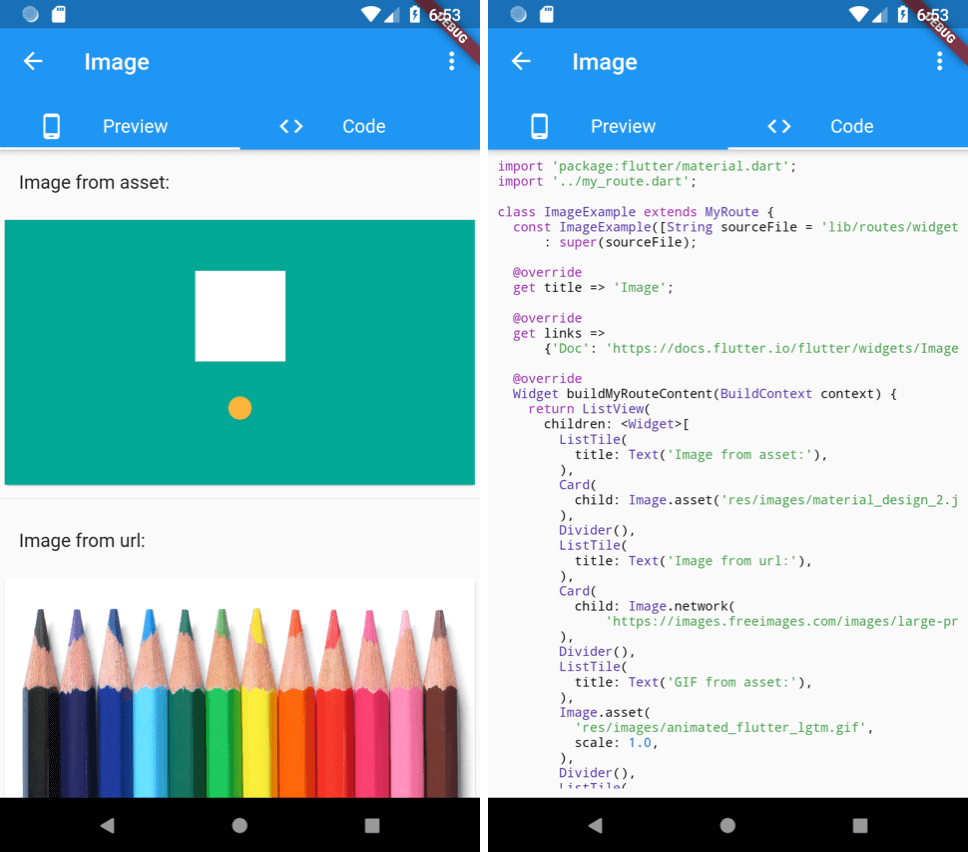
Overview
A Flutter widget that displays source code alongside its rendered output in a side-by-side layout. Ideal for documentation, tutorials, or educational apps where users need to see both the code and its visual result simultaneously. The widget supports syntax highlighting and is compatible across all major platforms including Android, iOS, Web, macOS, Windows, and Linux.
Use cases
- Interactive coding tutorials
- Documentation with live examples
- Educational apps for learning Flutter
- Code demonstration in apps
- Real-time code-preview integration
Key features
- Side-by-side code and preview display
- Syntax highlighting
- Cross-platform compatibility
- Easy integration with Flutter projects
- Supports multiple programming languages
Suitable for
- Developers creating learning materials
- Flutter educators
- Technical content creators
- App developers showcasing code examples
- Teams building interactive documentation
Considerations
- Requires proper setup of syntax highlighting
- May impact performance with large code blocks
- Limited customization options for layout
- Depends on external syntax parsing libraries
- Best suited for static or semi-dynamic code snippets