Search packages, repositories and app categories

adaptive_dialog cover
Package detailsv3.1.0

adaptive_dialog

Show alert dialog or modal action sheet adaptively according to platform.

AndroidiOSWebmacOSWindowsLinux
30-day downloads
40.9K
Likes
1.1K
Pub points
160

Install package

flutter pub add adaptive_dialog

Package Overview

Package selection guidance compiled from public package information, community data, and project usage.

Adaptive Dialog is a Flutter package that displays alert dialogs or modal action sheets in a platform-appropriate manner. It automatically selects the best UI pattern for each target platform—using native-style dialogs on Android and iOS, and consistent web/desktop layouts on other platforms. This ensures a cohesive user experience across devices without requiring manual platform checks. The package simplifies cross-platform dialog implementation with minimal code, supporting both simple alerts and complex actions. It integrates seamlessly into existing Flutter apps.

Use cases

  • Cross-platform dialog consistency
  • Native-like dialogs on mobile
  • Unified dialog handling on web and desktop
  • Simplifying platform-specific dialog logic
  • Enhancing UX with adaptive UI patterns

Key features

  • Automatic platform detection
  • Native dialog styles on Android and iOS
  • Consistent behavior across web and desktop
  • Minimal boilerplate code
  • Supports both alerts and action sheets

Suitable for

  • Developers targeting multiple platforms
  • Apps needing native dialog appearance
  • Teams prioritizing UX consistency
  • Projects with frequent dialog usage
  • Flutter beginners seeking simple dialog solutions

Considerations

  • Limited customization beyond basic options
  • Depends on underlying platform rendering
  • May require additional styling for complex layouts
  • Not ideal for highly customized dialog designs
  • Best suited for standard alert and action sheet scenarios

Original README

Original README snapshot from the linked source repository. Visit the repository for the latest content.

adaptive_dialog

Show alert dialog or modal action sheet adaptively according to platform.

Web Demo: https://mono0926.com/adaptive_dialog/

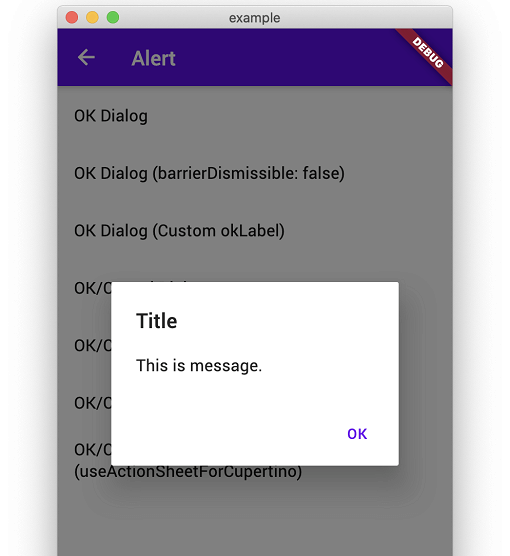
showOkAlertDialog

Convenient wrapper of showAlertDialog.

iOS Android
n1 n2

showOkCancelAlertDialog

Convenient wrapper of showAlertDialog.

iOS Android
n3 n4
n5 n6

showConfirmationDialog

Show Confirmation Dialog. For Cupertino, fallback to ActionSheet.

iOS Android
n3 n5

showModalActionSheet

iOS Android
n7 n8
n9 n10
n11 n12

showTextInputDialog

iOS Android
n1 n2
n3 n4

showTextAnswerDialog

Show text input dialog until answer is correct or cancelled. This is useful for preventing very destructive action is executed mistakenly.

iOS Android
n5 n6

FAQ

How can I customize it flexibly?

This packages keeps usage and UI simple like iOS official alert dialog. Therefore, if you need more flexibility than this package provides, I recommend that you build your own directly using standard APIs to meet your requirements without using this package.

  • https://github.com/mono0926/adaptive_dialog/issues/19#issuecomment-754476937
  • https://github.com/mono0926/adaptive_dialog/issues/76#issuecomment-1120686982
  • https://github.com/mono0926/adaptive_dialog/issues/108#issuecomment-1543068734

The getter modalBarrierDismissLabel was called on null

adaptive_dialog uses Cupertino-style widgets internally on iOS, so GlobalCupertinoLocalizations.delegate is required under certain conditions.

import 'package:flutter/material.dart';
import 'package:flutter_localizations/flutter_localizations.dart';

class App extends StatelessWidget {
  const App({Key key}) : super(key: key);

  @override
  Widget build(BuildContext context) {
    return MaterialApp(
      //...
      localizationsDelegates: const [
        GlobalMaterialLocalizations.delegate,
        GlobalWidgetsLocalizations.delegate,
        GlobalCupertinoLocalizations.delegate, // This is required
      ],
    );
  }
}

The input text color same with backgound when using CupertinoTextInputDialog

This fixes the problem.

import 'package:flutter/cupertino.dart';
import 'package:flutter/material.dart' hide Router;

class App extends StatelessWidget {
  const App({Key key}) : super(key: key);

  @override
  Widget build(BuildContext context) {
    return MaterialApp(
      darkTheme: ThemeData(
        cupertinoOverrideTheme: const CupertinoThemeData(
          textTheme: CupertinoTextThemeData(), // This is required
        ),
      ),
    );
  }
}

macOS style and Web / WASM compatibility

AdaptiveStyle.macOS utilizes macos_ui widgets on native macOS. On Web platforms (both JavaScript and WASM), macos_ui is excluded to ensure Web and WASM compatibility, and dialogs configured with macOS style automatically fall back to Cupertino (iOS-style) dialogs.

Categories

Dependencies

Dependency list 7 items

Source repository

Projects using this package