Package selection guidance compiled from public package information, community data, and project usage.
m_calendar is a lightweight and highly customizable Flutter package for building calendar widgets. It supports both day-based and list-based selection modes, allowing users to pick dates or view events in a structured list. Developers can apply custom decorations to dates, such as colors, icons, or badges, to highlight specific days. The package is designed for simplicity and performance across all major platforms, including Android, iOS, Web, macOS, Windows, and Linux. Ideal for apps requiring intuitive date selection with visual customization.
Use cases
Date picker in scheduling apps
Event planning with highlighted dates
User birthday or anniversary tracking
Calendar views in productivity tools
Custom date selection interfaces
Key features
Supports day and list selection modes
Extensible date decoration system
Lightweight and performant
Cross-platform compatibility
Easy integration with Flutter UI
Customizable appearance and behavior
Suitable for
Developers building calendar features
Apps needing date selection with visual feedback
Projects requiring minimal dependencies
Cross-platform calendar implementations
UI designers wanting flexible date styling
Considerations
Limited built-in event management
No native recurring event support
Requires manual handling of date logic
Best suited for simple to moderately complex calendars
Not ideal for full-featured calendar apps with advanced scheduling
Original README
Original README snapshot from the linked source repository. Visit the repository for the latest content.
📆 m_calendar
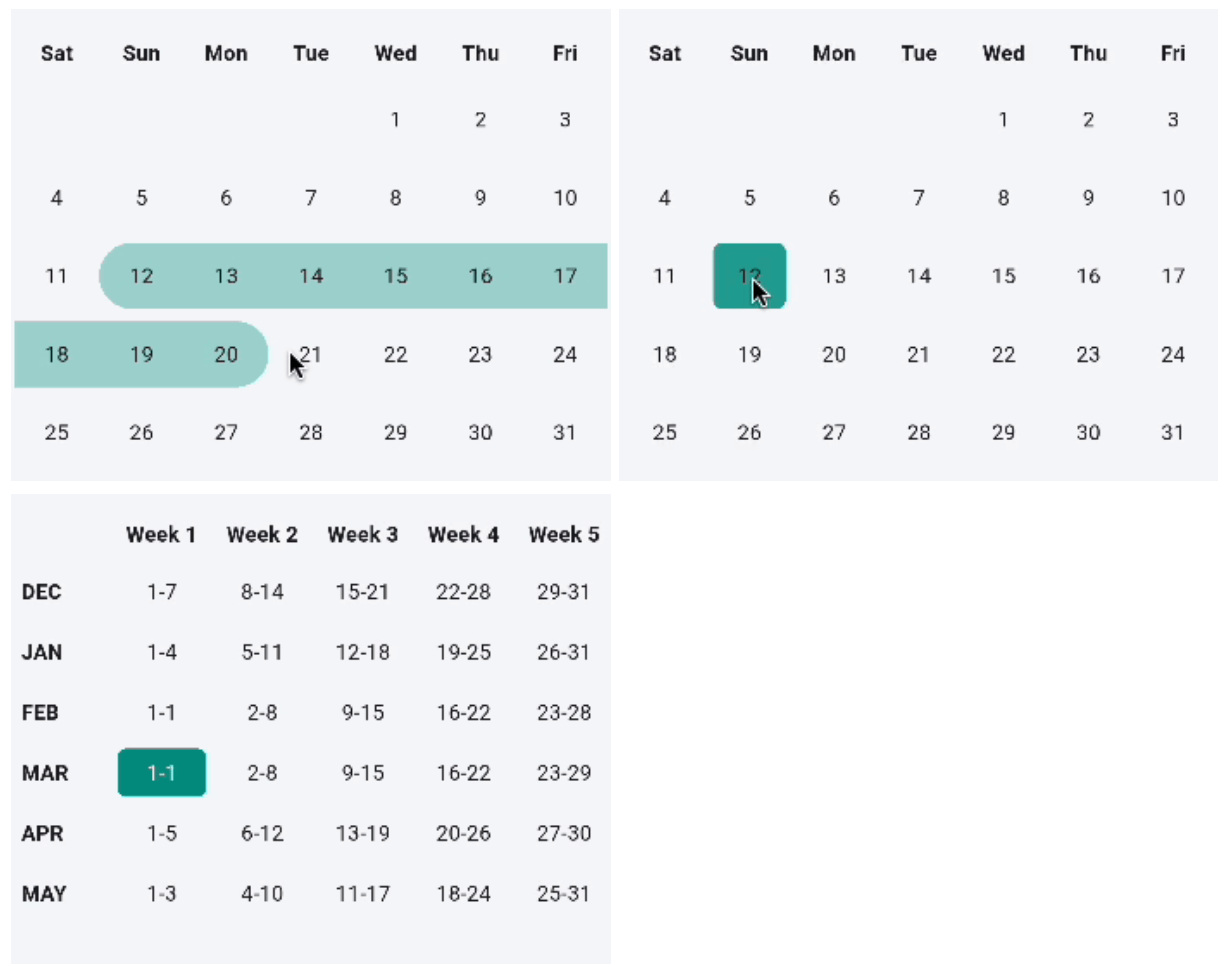
A customizable, lightweight Flutter calendar package with monthly, weekly, and horizontal layouts, single/range date selection, marked dates, and a built-in month/year picker.
🖼️ Previews
✨ Features
Feature
Monthly
Weekly
Horizontal
Single-date selection
✅
✅
✅
Range selection
✅
—
—
Marked dates
✅
—
✅
Month/year picker
✅
—
✅
Custom cell decoration
✅
✅
✅
Custom cell widget
✅
✅
✅
Auto-scroll to date
—
—
✅
📝 Behavioral notes
Monthly and weekly views start the week on Saturday by default. Pass
startDay (e.g. Day.monday) to change it.
The weekly view reports a single picked date per tap (the first day of the
selected week). The isRangeSelection flag is accepted for API symmetry, but
weekly range selection is not implemented yet.
The horizontal view is always single-select, and selectedDay is initialized
to today before any interaction — so controller.selectedDates returns
[today] until the user (or controller) picks another date.
A cross-month range set via controller.selectRange(start, end) is truncated
to the end of the start month.
Attach one MCalendarController per MCalendar widget. Attaching the same
controller to multiple calendars is not supported.
🚀 Installation
Add to your pubspec.yaml:
dependencies:m_calendar:^1.4.0
Then run:
flutter pub get
Import in your Dart file:
import'package:m_calendar/m_calendar.dart';
📖 Usage
Monthly calendar (default)
MCalendar(
selectedMonth: DateTime.now(),
onUserPicked: (List<DateTime> dates) {
// Single selection → list contains one date.print(dates);
},
)
Monthly calendar with range selection
MCalendar(
selectedMonth: DateTime.now(),
isRangeSelection: true,
onUserPicked: (List<DateTime> dates) {
// Range → list contains every date in the selected range.// The callback fires only once both range endpoints are picked.print('From ${dates.first} to ${dates.last}');
},
)
MCalendar(
  selectedMonth: DateTime.now(),
  showMonthYearPicker: true, // tap the header to open the picker
  onUserPicked: (dates) => print(dates),
)
Note:MCalendar.monthly(...) defaults showMonthYearPicker to true.
The MCalendar(...) shorthand defaults it to false. Explicitly set it to
your preference.
Programmatic control with MCalendarController
Control navigation and programmatic selections from outside the calendar:
Animations automatically become instant when the platform requests reduced
motion (MediaQueryData.disableAnimations).
Weekly calendar
MCalendar.weekly(
selectedMonth: DateTime.now(),
startDay: Day.sunday, // first day of the week; defaults to Day.saturday
onUserPicked: (List<DateTime> dates) {
// Returns [firstDayOfSelectedWeek].print(dates);
},
)
The weekly view shows a scrollable table with one row per month (last 6 months)
and up to 6 week columns. Months that span 6 calendar weeks (e.g. September
2023 with a Saturday week start) are displayed correctly without data loss.
Horizontal calendar
// Wrap in a SizedBox or Expanded to give the view a bounded height.SizedBox(
width: double.infinity,
height: 120,
child: MCalendar.horizontal(
selectedMonth: DateTime.now(),
onUserPicked: (DateTime date) {
// Always a single date.print(date);
},
),
)
The horizontal view callback is void Function(DateTime) — not a List —
because the horizontal view only supports single-date selection.
Horizontal calendar with date range and auto-scroll
MarkedDaysModel and Day are now re-exported from m_calendar.dart.
You can remove separate imports if you had them:
// Beforeimport'package:m_calendar/m_calendar.dart';
import'package:m_calendar/model/marked_date_model.dart';
import'package:m_calendar/provider/weekly_calendar_table_provider.dart';
// Afterimport'package:m_calendar/m_calendar.dart'; // MarkedDaysModel and Day included
🔍 Frequently Asked Questions
Q: Why does the range callback fire only when both endpoints are selected?
A: The callback fires once the range is complete (two taps). During the first tap,
rangeStart is set internally; the callback fires on the second tap with the full
sorted date list.
Q: What happens if I tap the same date twice in range mode?
A: A single-date range is returned: [date].
Q: What happens if I tap a third date after completing a range?
A: The old range is cleared and a new range starts from the third tap.
Q: Can I use DateTime values with time components for markedDaysList?
A: Yes. Date matching always ignores the time component — only year, month,
and day are compared.
Q: Can I show more than one decoration model on the same date?
A: The first matching MarkedDaysModel wins. Ensure no two models share the
same date if you want distinct decorations.
Q: Why does MCalendar.weekly show up to 6 week columns?
A: Depending on startDay, some months span 6 calendar weeks (e.g. September
2023 with a Saturday start). Previous versions silently dropped the 6th week;
1.4.0 renders it correctly.