Search packages, repositories and app categories

expandable_page_view cover
Package detailsv1.3.0

expandable_page_view

A PageView widget adjusting it's height to currently displayed page

AndroidiOSWebmacOSWindowsLinux
30-day downloads
173K
Likes
596
Pub points
160

Install package

flutter pub add expandable_page_view

Package Overview

Package selection guidance compiled from public package information, community data, and project usage.

The expandable_page_view package enhances Flutter's PageView by dynamically adjusting its height based on the content of the currently visible page. This allows for smooth, responsive scrolling where each page can have varying heights without disrupting the overall layout. Ideal for apps with variable-height content such as forms, cards, or dynamic lists. The package supports all major platforms including Android, iOS, Web, macOS, Windows, and Linux, ensuring consistent behavior across devices.

Use cases

  • Dynamic form pages
  • Variable-height card layouts
  • Responsive scrollable content
  • Interactive onboarding screens
  • Content-heavy dashboards

Key features

  • Height adapts to current page
  • Smooth transitions between pages
  • Cross-platform compatibility
  • Simple integration with PageView
  • Supports nested scroll views

Suitable for

  • Apps with variable-height pages
  • Developers seeking responsive scroll behavior
  • Projects requiring adaptive UI layouts
  • Mobile and web applications with dynamic content
  • UI designers wanting flexible scroll experiences

Considerations

  • May impact performance with heavy content
  • Requires careful handling of scroll physics
  • Not ideal for fixed-height page designs
  • Limited customization beyond height adjustment
  • Best used with predictable page content sizes
Original README

Original README snapshot from the linked source repository. Visit the repository for the latest content.

expandable_page_view

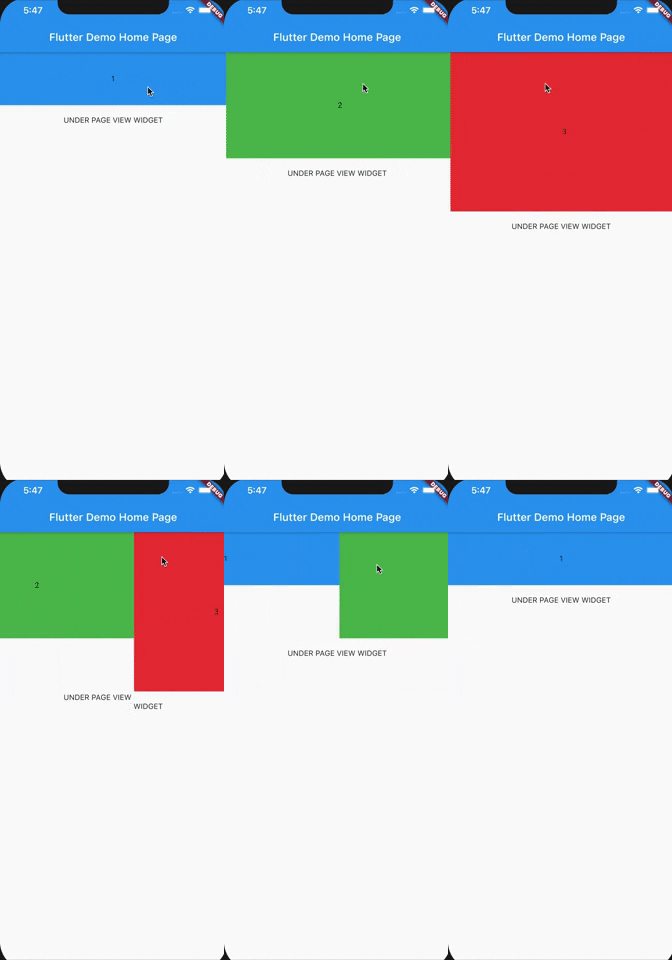
A PageView widget adjusting its height to currently displayed page. It accepts the same parameters as classic PageView.

Horizontal Vertical

Getting Started

In the pubspec.yaml of your flutter project, add the following dependency:

dependencies:
  ...
  expandable_page_view: ^1.0.17

Import it:

import 'package:expandable_page_view/expandable_page_view.dart';

Usage Examples

Fixed Expandable Page View

In order to create a fixed page view just pass a list of widgets to children parameter:

ExpandablePageView(
  children: [
     ExamplePage(Colors.blue, "1", 100),
     ExamplePage(Colors.green, "2", 200),
     ExamplePage(Colors.red, "3", 300),
  ],
),
Dynamically built Expandable Page View

If You have multiple pages to display, and You want to build them dynamically while scrolling, use .builder constructor and pass itemCount and itemBuilder parameters:

ExpandablePageView.builder(
  itemCount: 3,
  itemBuilder: (context, index) {
    return ExamplePage(Colors.blue, index.toString(), (index + 1) * 100.0);
  },
),
Loop Mode

To create an infinitely scrolling page view, set loop: true:

ExpandablePageView(
  loop: true,
  children: [
    ExamplePage(Colors.blue, "1", 100),
    ExamplePage(Colors.green, "2", 200),
    ExamplePage(Colors.red, "3", 300),
  ],
),
Programmatic Control in Loop Mode

To programmatically navigate pages in loop mode (e.g., for auto-play carousels or custom indicators), use ExpandablePageController:

final controller = ExpandablePageController(itemCount: 3);

ExpandablePageView(
  controller: controller,
  loop: true,
  children: [
    ExamplePage(Colors.blue, "1", 100),
    ExamplePage(Colors.green, "2", 200),
    ExamplePage(Colors.red, "3", 300),
  ],
),

// Navigate programmatically
controller.jumpToPage(2);
controller.animateToPage(0, duration: Duration(milliseconds: 300), curve: Curves.ease);

// Read current page
print(controller.page);     // e.g., 1.5 (fractional during scroll)
print(controller.realPage); // e.g., 1 (rounded)

Note: ExpandablePageController uses shortest-path navigation — animating from page 0 to the last page will scroll backward (1 step) rather than forward through all pages.

Check out example project to play with ExpandablePageView.

Categories

Source repository

Projects using this package