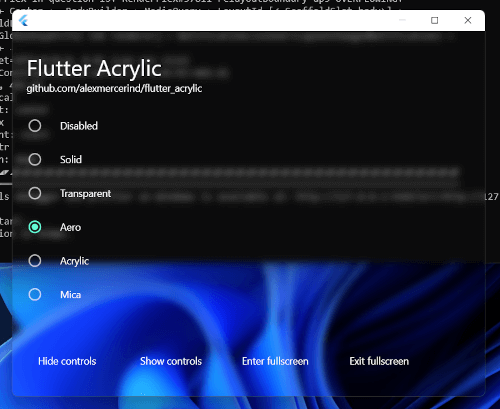
Package selection guidance compiled from public package information, community data, and project usage.
flutter_acrylic enables glassmorphic UI effects such as acrylic, mica, and transparency on Flutter applications for Windows, macOS, and Linux. It leverages native platform capabilities to apply visually appealing, translucent material designs that match the operating system's aesthetic. Ideal for modern desktop apps seeking immersive, contemporary interfaces with depth and light effects. The package integrates seamlessly with Flutter’s widget system and requires minimal setup via a simple pub add command.
Use cases
Creating modern desktop app interfaces
Implementing mica and acrylic backgrounds
Adding transparency effects to panels and overlays
Designing immersive user experiences
Building visually rich desktop applications
Enhancing UI with OS-native blur effects
Key features
Supports acrylic and mica effects on Windows, macOS, and Linux
Uses native platform APIs for authentic visuals
Minimal configuration required
Seamless integration with Flutter widgets
Real-time transparency and blur rendering
Cross-platform consistency
Suitable for
Desktop app developers targeting Windows, macOS, and Linux
Designers focused on glassmorphic and modern UI aesthetics
Apps requiring OS-level visual effects
Developers building immersive or premium desktop experiences
Teams aiming for native-like appearance across platforms
Considerations
Requires platform-specific setup for full functionality
Limited to desktop platforms (not mobile)
Performance may vary on lower-end hardware
Effects may not render identically across all OS versions
Not compatible with Flutter Web or mobile platforms
May require additional permissions on some systems
Original README
Original README snapshot from the linked source repository. Visit the repository for the latest content.
Aero glass effect. Windows Vista & Windows 7 like glossy blur effect.
✅
✅
WindowEffect.acrylic
Acrylic is a type of brush that creates a translucent texture. You can apply acrylic to app surfaces to add depth and help establish a visual hierarchy. Works only on Windows 10 version 1803 or higher.
✅
✅
WindowEffect.mica
Mica is an opaque, dynamic material that incorporates theme and desktop wallpaper to paint the background of long-lived windows. Works only on Windows 11 or greater.
✅
✅
WindowEffect.tabbed
Tabbed is a Mica like material that incorporates theme and desktop wallpaper, but is more sensitive to desktop wallpaper color. Works only on later Windows 11 versions (builds higher than 22523).
✅
✅
WindowEffect.titlebar
The material for a window’s titlebar.
✅
WindowEffect.menu
The material for menus.
✅
WindowEffect.popover
The material for the background of popover windows.
✅
WindowEffect.sidebar
The material for the background of window sidebars.
✅
WindowEffect.headerView
The material for in-line header or footer views.
✅
WindowEffect.sheet
The material for the background of sheet windows.
✅
WindowEffect.windowBackground
The material for the background of opaque windows.
✅
WindowEffect.hudWindow
The material for the background of heads-up display (HUD) windows.
✅
WindowEffect.fullScreenUI
The material for the background of a full-screen modal interface.
✅
WindowEffect.toolTip
The material for the background of a tool tip.
✅
WindowEffect.contentBackground
The material for the background of opaque content.
✅
WindowEffect.underWindowBackground
The material to show under a window's background.
✅
WindowEffect.underPageBackground
The material for the area behind the pages of a document.
✅
Windows 10 versions higher than 1803 & all Windows 11 versions are supported by the plugin, although not all effects might be available to a particular Windows version. See pinned issues if you encounter some problem or feel free to file one yourself.
Other Utilities
Enter Fullscreen
Window.enterFullscreen();
Exit Fullscreen
Window.exitFullscreen();
Hide Controls
Window.hideWindowControls();
Show Controls
Window.showWindowControls();
macOS Specific
Get the height of the titlebar when the full-size content view is enabled.
final titlebarHeight = Window.getTitlebarHeight();
On Windows 11 versions higher than or equal to 22523, DwmSetWindowAttribute API is used for WindowEffect.acrylic, WindowEffect.mica & WindowEffect.tabbed effects.
This plugin uses the undocumented SetWindowCompositionAttribute API from user32.dll on Windows 10 & early Windows 11 versions to achieve the acrylic effect.
Learn more at Rafael Rivera's amazing blog post about this here.
[ONLY on Windows 10] In most cases, you might wanna render custom window frame because the blur effect might leak outside the window boundary.
You can use bitsdojo_window to make a custom window for your Flutter application.
WindowEffect.acrylic causes lag on window drag in Windows 10, this issue is fixed by Microsoft in Windows 11. This issue can be prevented by a "hack", however nothing has been done within the plugin to circumvent this on Windows 10.
WindowEffect.mica & WindowEffect.tabbed only works on Windows 11.
You can see the example application for further details.
macOS
Additional setup for macOS:
flutter_acrylic depends on the macos_window_utils plugin, which requires macOS 10.14.6 or above. Please update your macOS deployment target as follows:
Open the macos/Runner.xcworkspace folder of your project using Xcode, press ⇧ + ⌘ + O and search for Runner.xcodeproj. Go to Info > Deployment Target and set the macOS Deployment Target to 10.14.6 or above.
Additionally, you may need to open the Podfile in your Xcode project and make sure the deployment target in the first line is set to 10.14.6 or above as well:
platform :osx, '10.14.6'
Depending on your use case, you may want to extend the area of the window that Flutter can draw to to the entire window, such that you are able to draw onto the window's title bar as well (for example when you're only trying to make the sidebar transparent while the rest of the window is meant to stay opaque).
To do so, enable the full-size content view with the following Dart code:
When you decide to do this, it is recommended to wrap your application (or parts of it) in a TitlebarSafeArea widget as follows:
TitlebarSafeArea(
  child: YourApp(),
)
This ensures that your app is not covered by the window's title bar.
Additionally, it may be worth considering to split your sidebar and your main view into multiple NSVisualEffectView's inside your
app. This is because macOS has a feature called “wallpaper tinting,” which is enabled by default. This feature allows windows to
blend in with the desktop wallpaper:
To achieve the same effect in your Flutter application, you can set the window's window effect to WindowEffect.solid and wrap
your sidebar widget with a TransparentMacOSSidebar widget like so:
Note: The widget will automatically resize the NSVisualEffectView when a resize is detected in the widget's build method.
If you are animating your sidebar's size using a TweenAnimationBuilder, please make sure that the TransparentMacOSSidebar widget
is built within the TweenAnimationBuilder's build method, in order to guarantee that a rebuild is triggered when the size
changes. For reference, there is a working example in the sidebar_frame.dart file of the example project.
Linux
Additional setup for Linux.
Find my_application.cc inside the linux directory of your Flutter project & remove following lines from it.
gtk_widget_show(GTK_WIDGET(window));
gtk_widget_show(GTK_WIDGET(view));
Adding blur to the Window.
Since current Flutter embedder on Linux uses GTK 3.0, so there is no official API available for backdrop blur of the window.
However, some desktop environments like KDE Plasma (with KWin compositor) have some third party scripts like kwin-forceblur from Eon S. Jeon, which allow to add blur to GTK 3.0 windows aswell (when the window is transparent, which you can certainly achieve using the plugin). Thus, this setup can be used to obtain result as shown in the picture.
Blur on Linux is more dependent on the compositor, some compositors like compiz or wayfire also seem to support blur effects.
License
MIT License. Contributions welcomed.
Aero blur effect.
Transparent Flutter window.
Transparent Flutter window on macOS Monterey with dark mode enabled.