Search packages, repositories and app categories

material_color_utilities cover
Package detailsv0.13.1

material_color_utilities

Algorithms and utilities that power the Material Design 3 color system, including choosing theme colors from images and creating tones of colors; all in a new color space.

AndroidiOSWebmacOSWindowsLinux
30-day downloads
11.6M
Likes
282
Pub points
150

Install package

flutter pub add material_color_utilities

Package Overview

Package selection guidance compiled from public package information, community data, and project usage.

A Dart package that implements the core algorithms of Material Design 3's color system, enabling dynamic theme generation from images and precise color tone creation. It operates in a new perceptual color space for more accurate and visually consistent results. The package supports advanced features like color harmonization, contrast optimization, and theme customization based on input imagery, ensuring accessibility and aesthetic quality across platforms.

Use cases

  • Generating themes from image backgrounds
  • Creating accessible color palettes
  • Automating UI color schemes
  • Designing responsive app themes
  • Implementing dynamic theming
  • Enhancing visual consistency

Key features

  • Perceptual color space for accurate representation
  • Image-based color extraction
  • Tone generation with light/dark variants
  • Accessibility-aware contrast adjustment
  • Support for Material Design 3 specifications
  • Cross-platform compatibility

Suitable for

  • UI designers implementing Material Design 3
  • Developers building dynamic theming systems
  • Apps requiring automated color scheme generation
  • Projects focused on accessibility and visual harmony
  • Teams using Flutter for multi-platform apps

Considerations

  • Requires understanding of Material Design 3 principles
  • May need additional processing for complex image inputs
  • Best used with design guidelines for optimal results
  • Limited to color system logic—no UI components
  • Not intended for general-purpose color manipulation

Original README

Original README snapshot from the linked source repository. Visit the repository for the latest content.

Material Color Utilities

Color is a foundational part of the Material Design system, alongside typography and shape. In products, color can communicate brand, reinforce meaning through semantic roles, and improve usability through accessible contrast.

Historically, teams hand-picked many colors to cover all UI use cases. In Material 3, dynamic color shifts

Library availability

Language Availability Location
C++ ✅
Dart ✅ pub package
Java ✅ MDC-Android
Swift ✅
TypeScript ✅ npm package
Kotlin ✅

Need another platform/language? Check the existing issues or open a new one.

Capabilities Overview

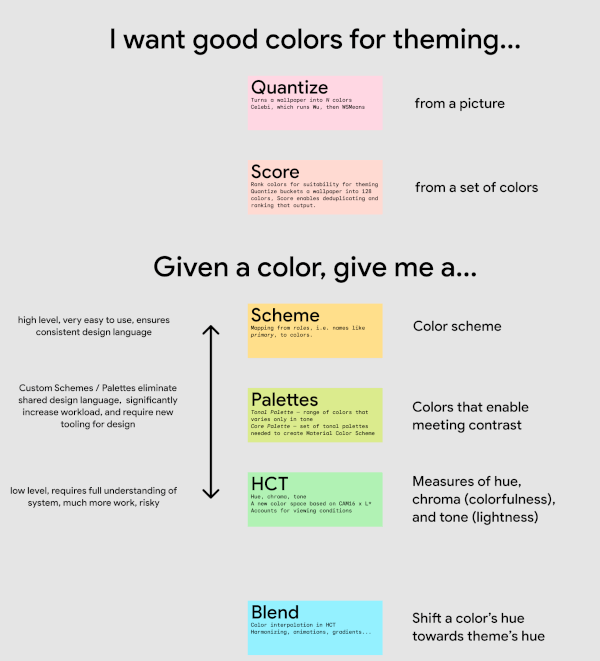
library components cheat sheet

The library consists of various components, each having its own folder and tests, designed to be as self-contained as possible. This enables seamless integration of subsets into other libraries, like Material Design Components and Android System UI. Some consumers do not require all components, for example, MDC doesn’t need quantization, scoring, image extraction.

Components Purpose
blend Interpolate, harmonize, animate, and gradate colors in HCT
contrast Measure contrast, obtain contrastful colors
dislike Check and fix universally disliked colors
dynamiccolor Obtain colors that adjust based on UI state (dark theme, style, preferences, contrast requirements, etc.)
hct A new color space (hue, chrome, tone) based on CAM16 x L*, that accounts for viewing conditions
palettes Tonal palette — range of colors that varies only in tone
Core palette — set of tonal palettes needed to create Material color schemes
quantize Turn an image into N colors; composed of Celebi, which runs Wu, then WSMeans
scheme Create static and dynamic color schemes from a single color or a core palette
score Rank colors for suitability for theming
temperature Obtain analogous and complementary colors
utilities Color — convert between color spaces needed to implement HCT/CAM16
Math — functions for ex. ensuring hue is between 0 and 360, clamping, etc.
String - convert between strings and integers

Learn about color science

The Science of Color & Design - Material Design

Try it out

Material Theme Builder

We recommend incorporating the Material Theme Builder Figma plugin and web tool into the design workflow. With them, designers can easily experiment with different dynamic color themes and see how they transform their designs with just a few clicks.

Categories

Dependencies

Dependency list 1 items

Source repository

Projects using this package