Search packages, repositories and app categories

tutorial_coach_mark cover
Package detailsv1.3.4

tutorial_coach_mark

Guide that helps you to present your app and its features in a beautiful, simple and customizable way. Tutorial | Guide | Coach.

AndroidiOSWebmacOSWindowsLinux
30-day downloads
222K
Likes
1.6K
Pub points
150

Install package

flutter pub add tutorial_coach_mark

Package Overview

Package selection guidance compiled from public package information, community data, and project usage.

TutorialCoachMark is a Flutter package designed to create elegant, customizable onboarding guides and feature tutorials for apps. It highlights specific UI elements with smooth animations and tooltips, helping users discover key features in an engaging way. Ideal for introducing new functionality or guiding first-time users through app workflows. The package supports multiple platforms including Android, iOS, Web, macOS, Windows, and Linux, ensuring consistent user experiences across devices.

Use cases

  • Onboarding new users
  • Highlighting app features
  • Guiding first-time interactions
  • Educating users about new updates
  • Improving user engagement

Key features

  • Customizable highlight shapes
  • Smooth animation transitions
  • Support for multiple platforms
  • Flexible tooltip positioning
  • Configurable overlay colors
  • Easy integration with existing widgets

Suitable for

  • App onboarding flows
  • Feature discovery tools
  • User education interfaces
  • Mobile and web applications
  • Designers seeking interactive tutorials

Considerations

  • May require careful layout planning
  • Performance impact with many marks
  • Limited built-in themes
  • Needs manual handling of navigation
  • Not ideal for complex multi-step workflows

Original README

Original README snapshot from the linked source repository. Visit the repository for the latest content.

pub package buymeacoffee

TutorialCoachMark

Create a beautiful and easy tutorial for your application.

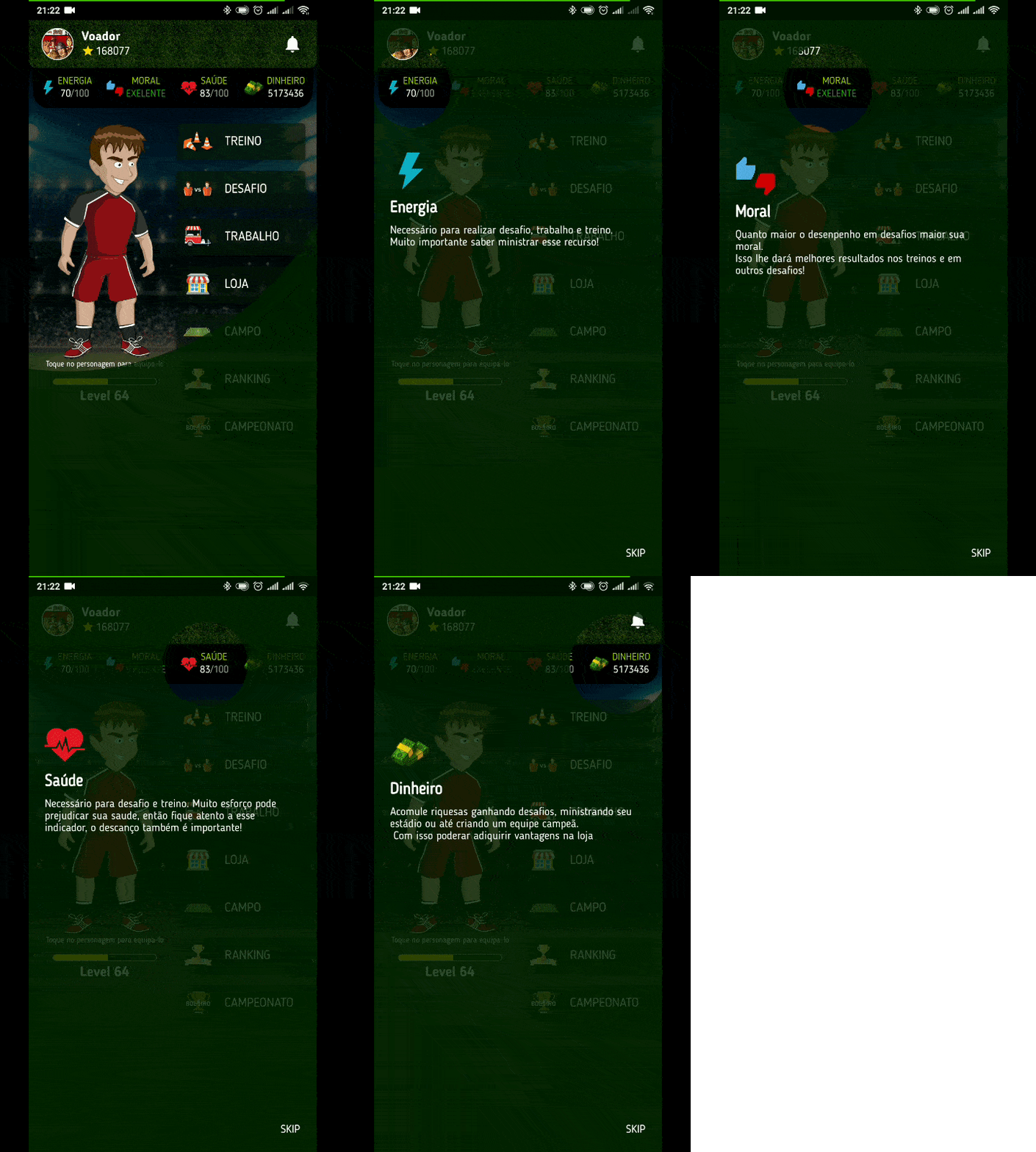
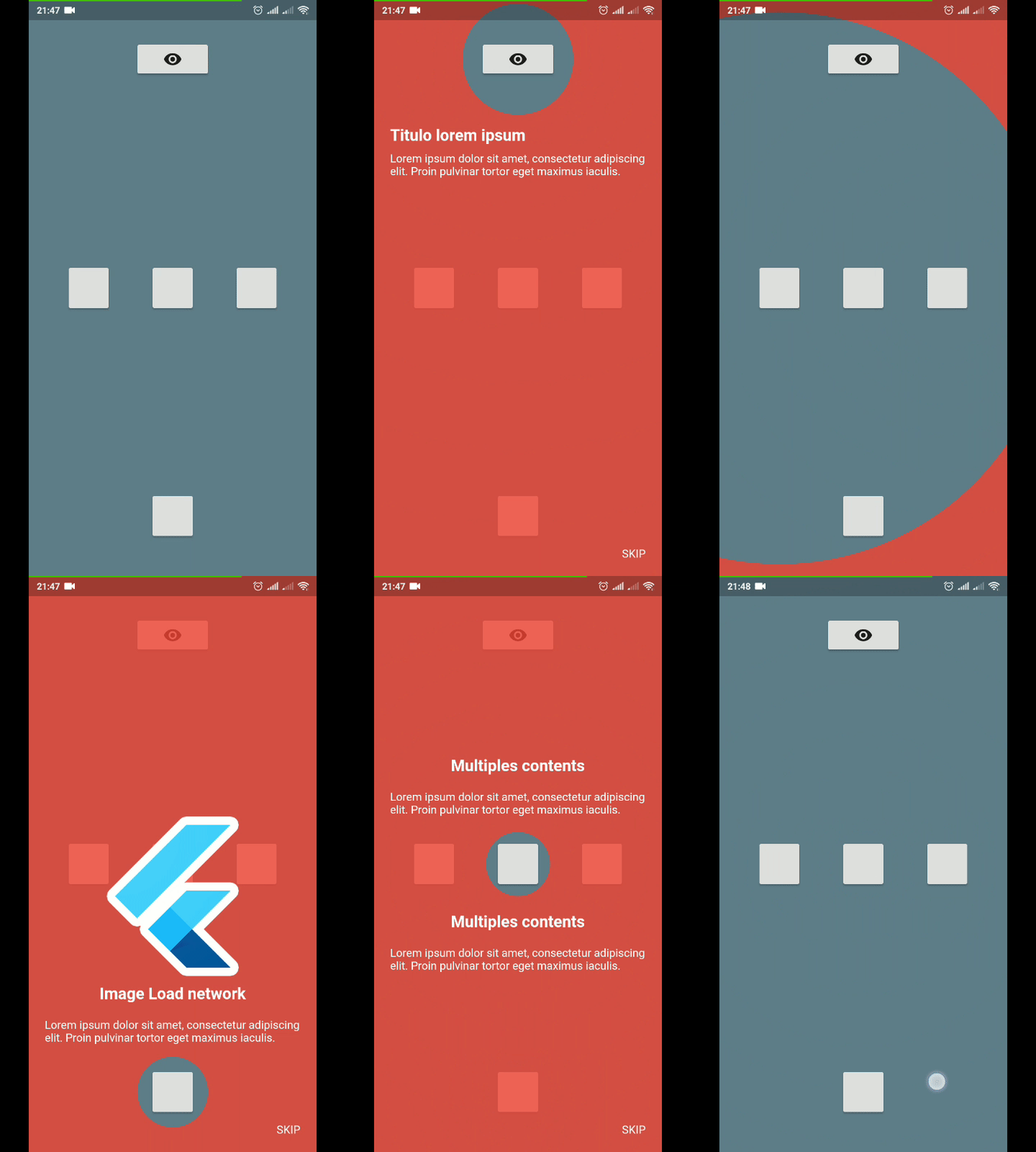
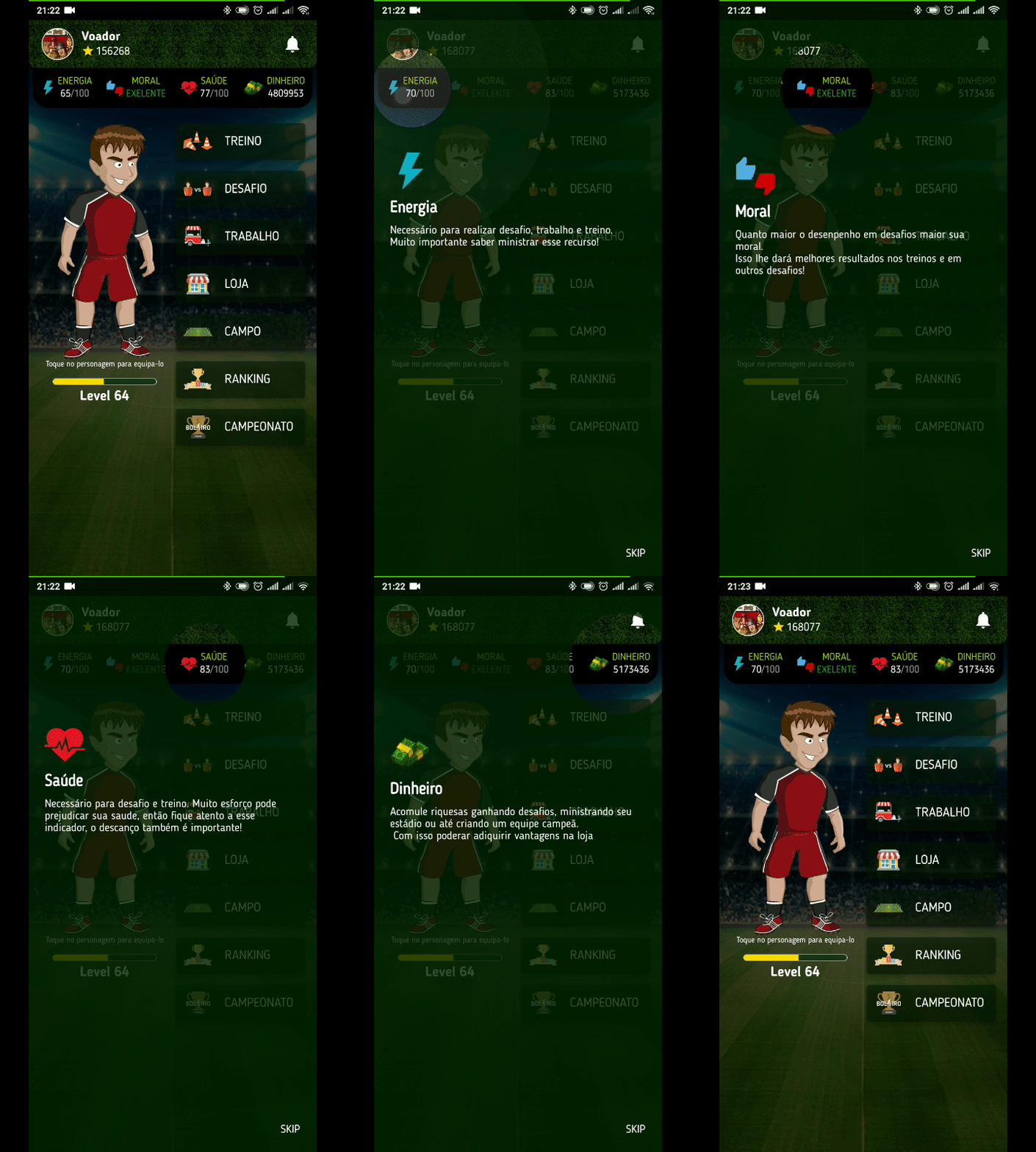
Example 1 Example 2

Usage

To use this plugin, add tutorial_coach_mark as a dependency in your pubspec.yaml file.

Example
import 'package:flutter/material.dart';
import 'package:tutorial_coach_mark/tutorial_coach_mark.dart';

void showTutorial() {
    TutorialCoachMark tutorial = TutorialCoachMark(
      targets: targets, // List<TargetFocus>
      colorShadow: Colors.red, // DEFAULT Colors.black
       // opacityShadow = 0.8,
       // alignSkip: Alignment.bottomRight,
       // textSkip: "SKIP",
       // textStyleSkip: const TextStyle(color: Colors.white),
       // skipWidget: MyWidget(),
       // hideSkip: false
       // showSkipInLastTarget: true,
       // paddingFocus: 10,
       // focusAnimationDuration: Duration(milliseconds: 500),
       // unFocusAnimationDuration: Duration(milliseconds: 500),
       // pulseAnimationDuration: Duration(milliseconds: 500),
       // pulseVariation: Tween(begin: 1.0, end: 0.99),
       // pulseEnable: true,
       // imageFilter: ImageFilter.blur(sigmaX: 8, sigmaY: 8),
       // initialFocus: 0,
       // useSafeArea: true,
       // finish: (){},
       // clickTarget: (TargetFocus) {},
       // onClickTargetWithTapPosition: (TargetFocus, TapDownDetails) {},
       // clickOverlay: (TargetFocus) {},
       // disableBackButton: false // If true disable native back button. 
      onFinish: (){
        print("finish");
      },
      onClickTargetWithTapPosition: (target, tapDetails) {
        print("target: $target");
        print("clicked at position local: ${tapDetails.localPosition} - global: ${tapDetails.globalPosition}");
      },
      onClickTarget: (target){
        print(target);
      },
      onSkip: (){
        print("skip");
        return true;
      }
    )..show(context:context);

    // tutorial.skip();
    // tutorial.finish();
    // tutorial.next(); // call next target programmatically
    // tutorial.previous(); // call previous target programmatically
    // tutorial.goTo(3); // call target programmatically by index
  }
Creating targets (TargetFocus)

TargetFocus is the class that represents the widget that will be focused and configure what will be displayed after you focus it.

Attributes:

Attribute Type Description
identify dynamic free for identification use
keyTarget GlobalKey GlobalKey widget that wants to be focused
targetPosition TargetPosition If you do not want to use GlobalKey, you can create a TargetPosition to determine where to focus
contents ContentTarget[] Content list you want to display after focusing widget
shape ShapeLightFocus ShapeLightFocus.Circle or ShapeLightFocus.RRect
radius double Use when shape = ShapeLightFocus.RRect
borderSide BorderSide
color Color Custom color to target
enableOverlayTab bool enable click in all screen to call next step
enableTargetTab bool enable click in target to call next step
alignSkip Alignment use to align the skip in the target
paddingFocus Alignment settings padding of the focus in target
focusAnimationDuration Duration override the widget's global focus animation duration
unFocusAnimationDuration Duration override the widget's global unfocus animation duration
pulseVariation Tween override interval pulse animation
Creating contents (ContentTarget)

ContentTarget is the class responsible for determining what should be displayed and how it will appear after focusing on the widget.

Attributes:

Attribute Type Description
align AlignContent With this attribute you determine in which region to display the content in relation to the focused widget (top,bottom,left,right)
padding EdgeInsets Padding of the content
child Widget Content you want to be displayed
builder Widget Content you want to be displayed
customPosition CustomTargetContentPosition Add custom position when align is AlignContent.custom
Example Complete
import 'package:flutter/material.dart';
import 'package:tutorial_coach_mark/tutorial_coach_mark.dart';

List<TargetFocus> targets = List();

 @override
 void initState() {
    targets.add(
        TargetFocus(
            identify: "Target 1",
            keyTarget: keyButton,
            contents: [
              TargetContent(
                  align: ContentAlign.bottom,
                  child: Container(
                    child:Column(
                      mainAxisSize: MainAxisSize.min,
                      crossAxisAlignment: CrossAxisAlignment.start,
                      children: <Widget>[
                        Text(
                          "Titulo lorem ipsum",
                          style: TextStyle(
                            fontWeight: FontWeight.bold,
                            color: Colors.white,
                            fontSize: 20.0
                          ),
                        ),
                        Padding(
                          padding: const EdgeInsets.only(top: 10.0),
                          child: Text("Lorem ipsum dolor sit amet, consectetur adipiscing elit. Proin pulvinar tortor eget maximus iaculis.",
                            style: TextStyle(
                                color: Colors.white
                            ),),
                        )
                      ],
                    ),
                  )
              )
            ]
        )
    );

    targets.add(
        TargetFocus(
            identify: "Target 2",
            keyTarget: keyButton4,
            contents: [
              TargetContent(
                  align: ContentAlign.left,
                  child: Container(
                    child: Column(
                      mainAxisSize: MainAxisSize.min,
                      crossAxisAlignment: CrossAxisAlignment.start,
                      children: <Widget>[
                        Text(
                          "Multiples content",
                          style: TextStyle(
                              fontWeight: FontWeight.bold,
                              color: Colors.white,
                              fontSize: 20.0
                          ),
                        ),
                        Padding(
                          padding: const EdgeInsets.only(top: 10.0),
                          child: Text("Lorem ipsum dolor sit amet, consectetur adipiscing elit. Proin pulvinar tortor eget maximus iaculis.",
                            style: TextStyle(
                                color: Colors.white
                            ),),
                        )
                      ],
                    ),
                  )
              ),
              TargetContent(
                  align: ContentAlign.top,
                  child: Container(
                    child: Column(
                      mainAxisSize: MainAxisSize.min,
                      crossAxisAlignment: CrossAxisAlignment.start,
                      children: <Widget>[
                        Text(
                          "Multiples content",
                          style: TextStyle(
                              fontWeight: FontWeight.bold,
                              color: Colors.white,
                              fontSize: 20.0
                          ),
                        ),
                        Padding(
                          padding: const EdgeInsets.only(top: 10.0),
                          child: Text("Lorem ipsum dolor sit amet, consectetur adipiscing elit. Proin pulvinar tortor eget maximus iaculis.",
                            style: TextStyle(
                                color: Colors.white
                            ),),
                        )
                      ],
                    ),
                  )
              )
            ]
        )
    );

    targets.add(
        TargetFocus(
            identify: "Target 3",
            keyTarget: keyButton5,
            contents: [
              TargetContent(
                  align: ContentAlign.right,
                  child: Container(
                    child: Column(
                      mainAxisSize: MainAxisSize.min,
                      crossAxisAlignment: CrossAxisAlignment.start,
                      children: <Widget>[
                        Text(
                          "Title lorem ipsum",
                          style: TextStyle(
                              fontWeight: FontWeight.bold,
                              color: Colors.white,
                              fontSize: 20.0
                          ),
                        ),
                        Padding(
                          padding: const EdgeInsets.only(top: 10.0),
                          child: Text("Lorem ipsum dolor sit amet, consectetur adipiscing elit. Proin pulvinar tortor eget maximus iaculis.",
                            style: TextStyle(
                                color: Colors.white
                            ),),
                        )
                      ],
                    ),
                  )
              )
            ]
        )
    );
}

void showTutorial() {
    TutorialCoachMark(
      targets: targets, // List<TargetFocus>
      colorShadow: Colors.red, // DEFAULT Colors.black
       // alignSkip: Alignment.bottomRight,
       // textSkip: "SKIP",
       // paddingFocus: 10,
       // opacityShadow: 0.8,
      onClickTarget: (target){
        print(target);
      },
      onClickTargetWithTapPosition: (target, tapDetails) {
        print("target: $target");
        print("clicked at position local: ${tapDetails.localPosition} - global: ${tapDetails.globalPosition}");
      },
      onClickOverlay: (target){
        print(target);
      },
      onSkip: (){
        print("skip");
        return true;
      },
      onFinish: (){
        print("finish");
      },
    )..show(context:context);
  }

Contribution

If you find any errors or want to add improvements, you can open a issue or develop the fix and open a pull request. Thank you for your cooperation!

Categories

Source repository

Projects using this package